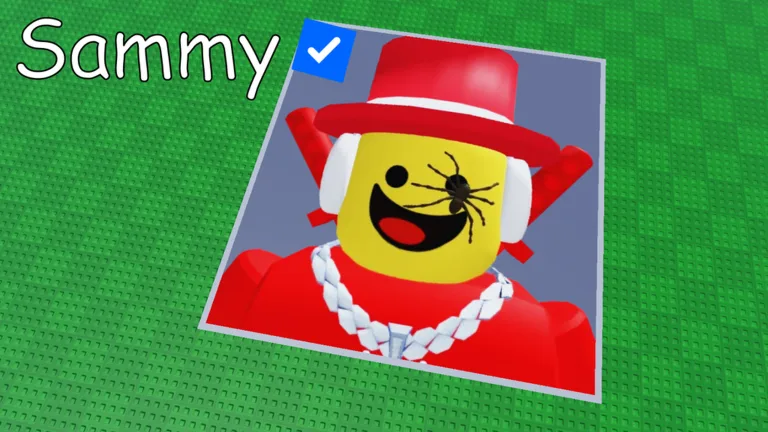
Quick Guide
- In Paint your Friends, load public Roblox profile icons from friends or celebrities as your canvas.
- The game transforms your chosen icon into a color-by-number template for painting.
- Select an icon directly within the game to begin your social coloring experience.
Understanding Icon Loading in Paint your Friends!
Paint your Friends! on Roblox offers a unique social coloring experience, transforming profile pictures into engaging, block-by-block canvases. A core mechanic that drives this creativity is the paint your friends Roblox icon loading system, which allows players to bring a personal touch to their artwork. This guide will walk you through how to utilize this feature, detailing the types of icons you can load and how to initiate your next colorful project.
At its heart, Paint your Friends! is a digital coloring book where the subjects are chosen by you. The game promises a focused experience: "paint icons block-by-block, share the result, and work beside other players in real time." The first step in this artistic journey is always selecting your subject, which the game simplifies by allowing you to load existing Roblox profile icons.
Whether you're looking to immortalize a friend's avatar, recreate a popular celebrity's image, or even paint your own iconic look, the game provides the tools to get started. Once an icon is loaded, it becomes a numbered grid, ready for your artistic interpretation.
Supported Icon Sources: Who Can You Paint?
The Paint your Friends! game is designed around a social rhythm, which extends directly to its icon loading capabilities. The game allows you to use a variety of existing Roblox profile icons as the foundation for your artwork. According to the game's description, players can "load their own, friends’, or celebrities’ icons" as the subject for their canvas.
This means you're not restricted to a predefined set of images. Instead, the game taps into the vast public library of Roblox user profile pictures. This open-ended approach fosters creativity and personal connection, letting you choose subjects that resonate with you or your social circle. The goal is to "choose a manageable first painting" from these available icons, allowing you to ease into the block-by-block coloring process.
The Simple Steps to Load Your Canvas
The process of initiating a new painting in Paint your Friends! begins with selecting your icon. While the game's interface is designed for intuitive play, the core sequence is straightforward:
- Enter the Game: Join a server in Paint your Friends! on Roblox.
- Locate the Icon Loading Feature: Within the game's environment, you will find an option to "Load an icon." This is where you'll select your subject.
- Choose Your Icon: From the available options, select a friend's profile icon, a celebrity's icon, or even your own. The game typically presents a way to browse or search for these public Roblox profiles.
- Confirm Selection: Once you've chosen your desired icon, confirm your selection. The game will then process this image.
After your selection, the game automatically converts the chosen profile icon into a pixelated, color-by-number template on your canvas. This transformation prepares the image for the block-by-block painting process, turning a complex image into a series of manageable, numbered squares.
Consider icon complexity when starting a new painting.
While any public Roblox icon can be loaded, choosing an icon with simpler colors and fewer intricate details can make for a more "manageable first painting" and a smoother introduction to the game's mechanics.
The Paint your Friends! Gameplay Loop
Once you've completed the paint your friends Roblox icon loading process, you're ready to dive into the core gameplay loop. This loop is described as a "tiny game with a lovely social rhythm," focusing on a relaxed and creative experience:
- Load an Icon: As detailed above, this is your first step, selecting the subject for your masterpiece.
- Paint Block-by-Block: With your icon loaded and transformed into a numbered grid, you proceed to color each block. The game encourages you to "Color by number at your own pace," emphasizing that "The fun is the steady reveal, not a fictional speedrun or rarity ladder."
- Share the Finish: After you've completed your painting, or when you feel it's ready, you can share your creation. The game facilitates this by allowing you to "Paint beside other players" and ensuring "the canvas save automatically."
This cycle encourages players to continually engage with new icons, explore different subjects, and share their artistic progress within the community.
Verifiable Game Details for Paint your Friends!
For those interested in the foundational details of Paint your Friends!, here's a snapshot of publicly available information as of August 9, 2026:
- Creator: prompted enterprises · group 314161503
- Genre: Party & Casual · Coloring & Drawing
- Server Size: 8 players
- Public Activity: 8,803 playing · 5,846,957 visits · 19,813 favorites
- Roblox Dates: Created July 11, 2026 · updated August 7, 2026
These details provide context for the game's development and current standing within the Roblox platform. For the most up-to-date information or to play the game, visit the official Roblox game page: Paint your Friends!
Paint your Friends! FAQ
What is Paint your Friends! on Roblox?
It is a social coloring-by-number experience where players can load their own, friends’, or celebrities’ icons, paint them block-by-block, share creations, and paint alongside other players in real time.
How does paint your friends Roblox icon loading work?
Players select a public Roblox profile icon—either their own, a friend's, or a celebrity's—directly within the game's interface. The game then automatically converts this chosen icon into a pixelated, color-by-number template on their canvas, ready for painting.
Does Paint your Friends! save my progress automatically?
Yes, the public Roblox description states that paintings save automatically. However, it does not publish a save interval or recovery guarantee, so it's a good practice to keep a screenshot of any art you particularly care about.
Can I use my own Roblox profile icon as a canvas?
Yes, the game explicitly allows players to load "their own" icons, in addition to those of friends or celebrities, to use as subjects for their canvas.